I think it's hard winning a war with words.
— Gone with the wind
I think it's hard winning a war with words.
Lerna is a tool that optimizes the workflow around managing multi-package repositories with git and npm.
痛点一:重复操作
痛点二:版本一致性
Lerna is a tool that optimizes the workflow around managing multi-package repositories with git and npm.
使用 Lerna 管理的大型项目:
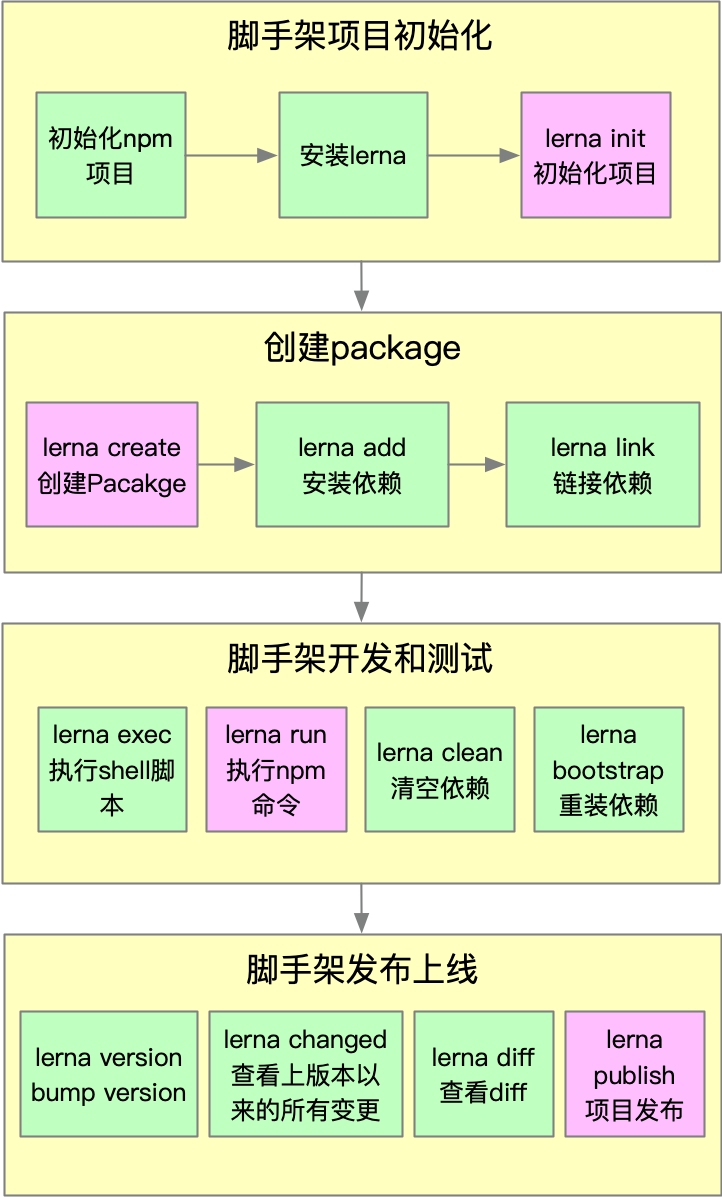
npm install -g lernagit init jun-cli && cd jun-clilerna init lerna create @jun-cli/core packageslerna add mocha packages/core --devlerna cleanlerna run testlerna run test @jun-cli/corelerna linklerna publish会自动完成 git 初始化,但不会创建.gitignore,,这个必须要手动添加,否则会将node_modules 目录都上传到git,如果node_modules 已经加入git stage,可使用:
git reset HEAD <file>执行 unstage 操作,如果文件已经被 git 监听到变更,可使用:
git checkout -- <file>将变更作废,记得在执行操作之前将文件加入.gitignore。
选项:
--dev:将依赖安装到devDependencies,不加时安装到dependencies。lerna add <package> [loc] --dev如果未发布上线,需要手动将依赖添加到package.json, 再执行lerna link。
只会删除node_modules,不会删除package.json中的依赖。
--scope属性后添加的是包名,而不是 package 的路径,这点和lerna add用法不同。
git add package-lock.json,所以package-lock.json不要加入 .gitignore。master 分支。lerna publish前先完成npm login。npm包名为:@xxx/yyy的格式,需要先在npm注册名为:xxx 的 organization,否则可能会提交不成功。npm group时默认为private,所以我们需要手动在package.json 中添加如下配置:"publishConfig": {
"access": "public"
}评论没有加载,检查你的局域网
Cannot load comments. Check you network.